
SSHFS for Developing on a Remote Server Posted on January 06, 2009 by Dave Fowler
As I mentioned in my previous post there is often a reason, such as subdomains or configuration issues, that you cannot develop on localhost. In this case you're going to have to develop on a remote server. This can be horribly inefficient if you're constantly ftp'ing new code or committing and updating through some revision control system.
I've found that the least obnoxious and most secure way of developing remotely is by mounting a remote drive through SSH using Secure SHell File System (SSHFS). Basically it mounts a folder on your computer and then writing and reading from that folder actually happen on your remote server through SSH protocol. Its incredibly secure and reasonably fast.
If you're on a mac you can use sshfs by installing Google's MacFuse. If you're on Windows try this. Linux users will have to install FUSE. Google for instructions specific to your distro. The rest of this post will deal with MacFuse on OS X.
MacFuse
After installing you should have an application called sshfs in your Applications directory. Run sshfs and in the file menu select "Connect to SSH Server" or the shortcut ⌘O. It will prompt you with the following display for your ip address (must be ip, domains don't work), username and the remote directory to mount. If you leave it blank it will default to ~/.
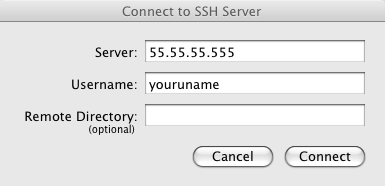
If all goes well it will prompt you for your password and a directory will be mounted for you in /Volumes/your.ip.address.here
Open that directory and files in your favorite editor and your development experience will be the same as if you were editing the files locally, except with some additional load and save lag while editing.